Rear Bumper - Replacement
14-59prose procedureRear bumper with rear fog light and license light wiring.
Replacement
- 1Remove the 2 bumper mount screws on each side at the corner edge of the bumper.
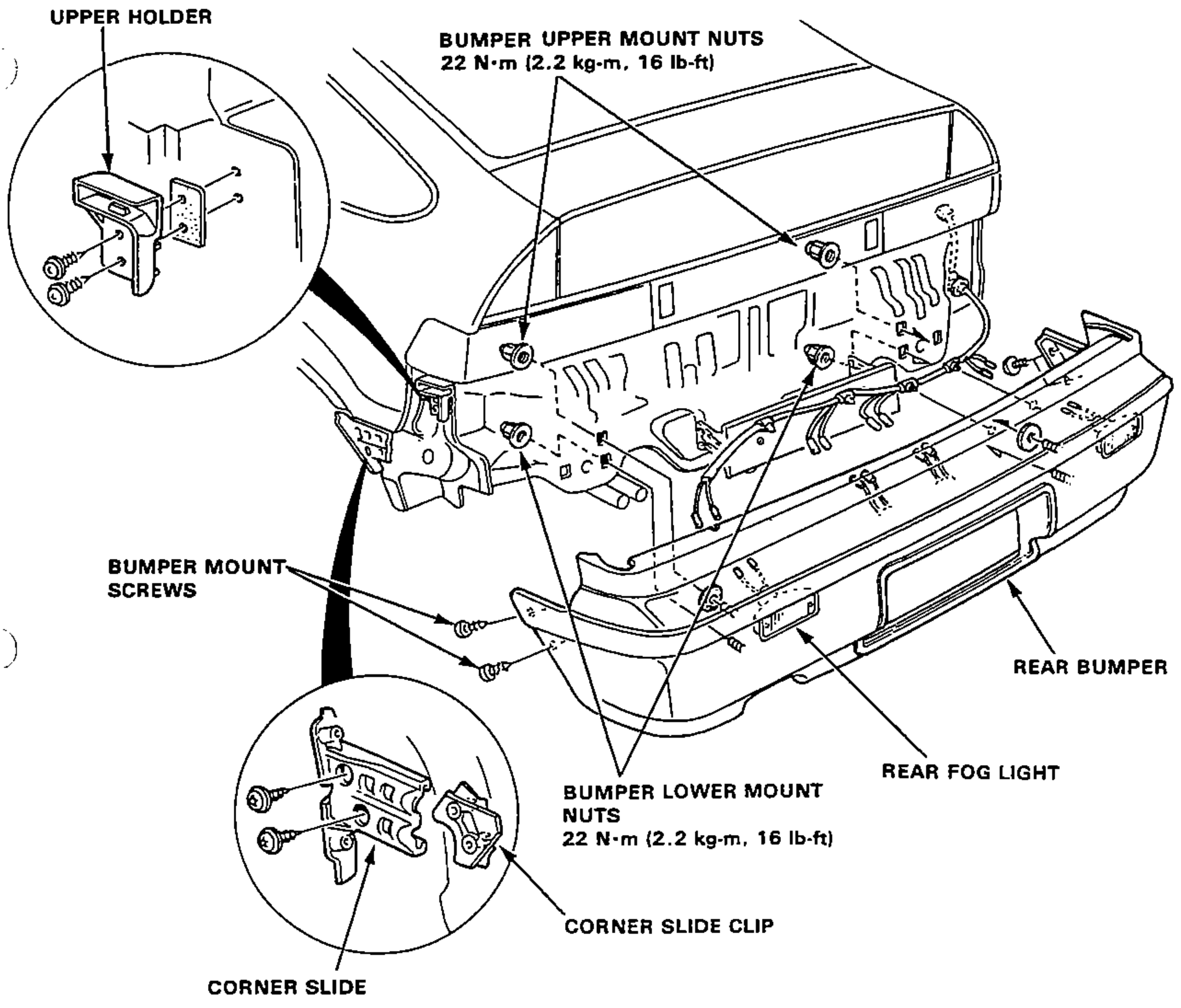
- 2Remove the 2 bumper lower mount nuts.
- 3Remove the rear trim panel.
- 4Remove the 2 bumper upper mount nuts from the trunk area.
- 5Remove the bumper by sliding it to the rear and disconnect the license light/rear fog light wire connectors.NOTE: Do not damage the threads of the bumper bolts.
- 6If necessary: Remove the screws, then remove the corner slide and slide clip.
- 7Installation sequence is essentially the reverse order of removal.
| Specification | Value |
|---|---|
| Bumper upper mount nuts | 22N·m |
| Bumper lower mount nuts | 22N·m |
Bumper upper mount nuts
22N·m
Bumper lower mount nuts
22N·m