
Wipers/Washers - Wiper/Washer Switch Test
16-156prose procedureUnverifiedSwitch location/terminal layout shown for both LHD and RHD.
Wiper/Washer Switch Test
- 1Remove the steering column covers.
- 2Disconnect 8-P and 6-P connectors from the switch.
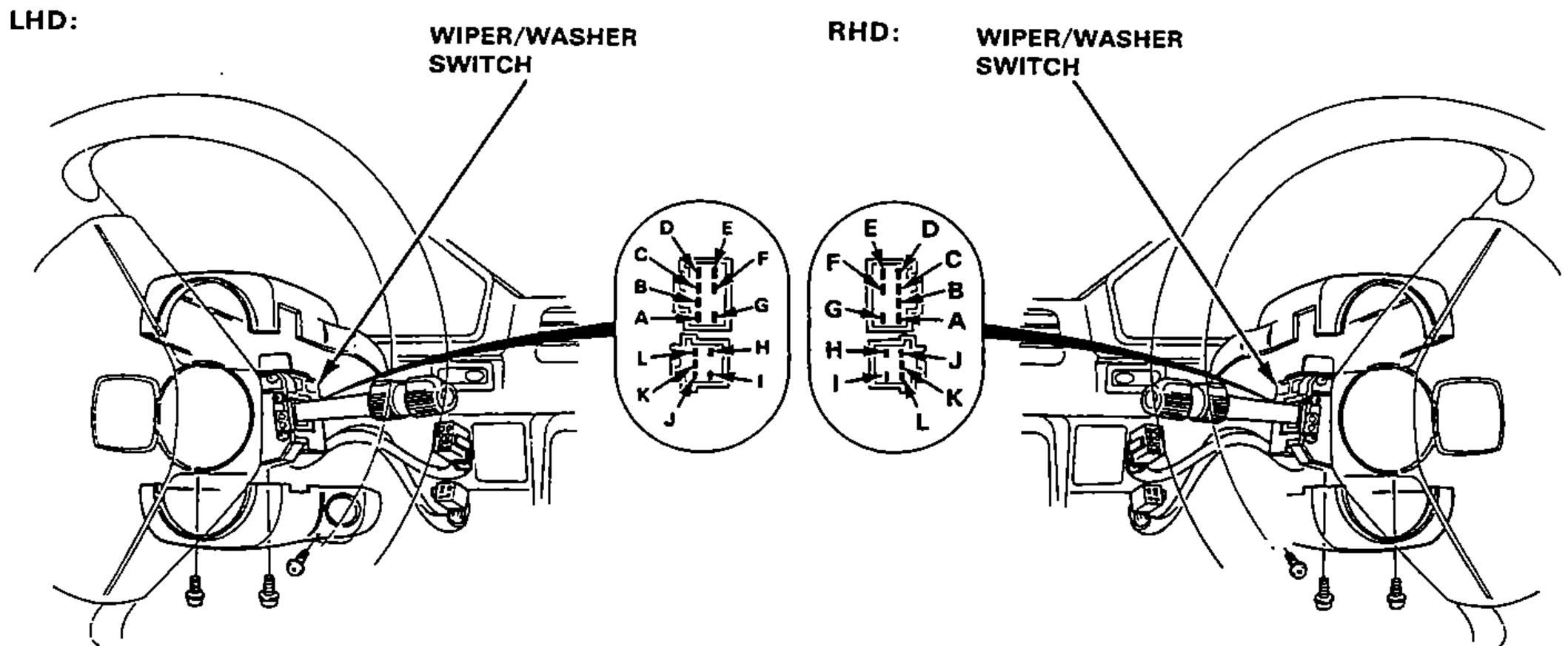
- 3Check for continuity between the terminal in each switch position according to the table.
Windshield
OFF
Terminals with continuity (A-G)A-F
INT
Terminals with continuity (A-G)C-D, A-F
LO
Terminals with continuity (A-G)A-G
HI
Terminals with continuity (A-G)B-G
Mist Switch "ON"
Terminals with continuity (A-G)B-G
Washer Switch "ON"
Terminals with continuity (A-G)D-E
Rear Window
Washer Switch "ON"
Terminals with continuity (H-L)H-I
OFF
Terminals with continuity (H-L)J-K
ON
Terminals with continuity (H-L)J-L
Washer Switch "ON"
Terminals with continuity (H-L)H-I